• New rules from 10/01/2023. There are restrictions on the forum for ordinary users!
    To download files, you need to upgrade your profile to the Premium group.
  • If during downloading you have a problem with downloading a torrent file and you see hieroglyphs, then right-click on the page of these hieroglyphs "SAVE AS"
EDIABAS Interface Switcher

PREMIUM EDIABAS Interface Switcher

Welcome to our automotive community!

Be a part of something great, join today!

EDIABAS Interface Switcher v1.0


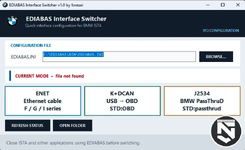
EDIABAS Interface Switcher for quickly changing the interface in the EDIABAS.INI file when working with BMW ISTA and other EDIABAS programs.


Supported modes:

- ENET
Interface = ENET
NetworkProtocol = tcp
RemoteHost = Autodetect
DiagnosticPort = 6801
ControlPort = 6811

- K+DCAN
Interface = STD:OBD
The COM port number is specified separately in OBD.INI.

- J2534 / BMW PassThruD
Interface = STD passthrud
NetworkProtocol = tcp
Port = 6408
The specific adapter is selected using the BMW PassThru Driver Configuration Tool.

Program features:

One-click interface switching;
Automatic search for standard EDIABAS.INI locations;
Manual EDIABAS.INI file selection;
Current mode display;
Automatic backup before each change;
Saving other INI sections and parameters;
Automatic Windows interface language selection;
15 built-in language options;
Single standalone EXE file – no separate .NET installation required;
The program does not use the internet and does not collect data.

Supported systems:

Windows 10/11 x64.

Language support:

When launched, the program automatically detects the Windows interface language and selects the appropriate translation. All buttons, status bars, dialog boxes, error messages, and notifications are translated.

There are 15 built-in language options:
Russian;
English;
German;
French;
Spanish;
Italian;
Polish;
Portuguese;
Dutch;
Ukrainian;
Turkish;
Simplified Chinese;
Traditional Chinese;
Japanese;
Korean.

If your Windows language is not listed, the program automatically uses the English interface. All translations are built into the EXE; no additional language files need to be installed.

Usage:

1. Close ISTA, INPA, Tool32, and other programs using EDIABAS.
2. Run EdiabasInterfaceSwitcher.exe as administrator.
3. Check the path to EDIABAS.INI or select the file manually.
4. Click ENET, K+DCAN, or J2534.
5. The program will create a backup copy of the original INI file next to it.

For J2534, the adapter manufacturer's driver and the BMW PassThruD Driver must be installed. For K+DCAN, the COM port in OBD.INI must match the adapter port in Windows Device Manager.


Important:
First, test the program on a copy of EDIABAS.INI;
Do not switch interfaces during diagnostics, coding, or programming;
This utility is not an official BMW product;
The EXE file does not have a commercial digital signature, so Windows SmartScreen may display a warning;
The author is not responsible for incorrect configuration or use of the program.
  • EDIABAS Interface Switcher 1.0.png
    EDIABAS Interface Switcher 1.0.png
    152.9 KB
Your Downloads Left: 0 / 0
1.0 Version
0 Downloads
36 Views
0.00 star(s) 0 ratings
Last update

More resources from Nutro

Back
Top Bottom